Tiers and existing content?
TLDR
I've lost count of how many creators I've seen accidentally lock their paying fans out of content because they assumed tier permissions inherit upward automatically. The truth is that your tier descriptions are just words on a page - the actual gate is the little tier-selection box on each post. Here's how to get it right in about twenty minutes, once, and never worry about it again.
Does "includes all lower tier perks" actually do anything technical?
No, and this is the misconception that trips up almost everyone running stacked tiers. When you write "Sugar tier includes everything from the lower tier plus NSFW photos" in your tier description, that's marketing copy. It sets expectations for your fans. It does not touch the access control system. What actually decides who sees a post is the per-post audience setting - the checkbox or dropdown where you pick which tiers can view it. The platform doesn't read your tier descriptions and smartly route content around. It reads the permissions you attached to that specific upload. So the tier ladder you've described to your fans is a promise; the post settings are the delivery mechanism. If those two things drift apart, you get exactly the two nightmare scenarios: a top-tier fan paying premium and missing content they were promised, or worse, an NSFW photo accidentally visible to your SFW-tier audience because you clicked the wrong box.
If I only tag a post to my mid-tier, do my top-tier fans see it?
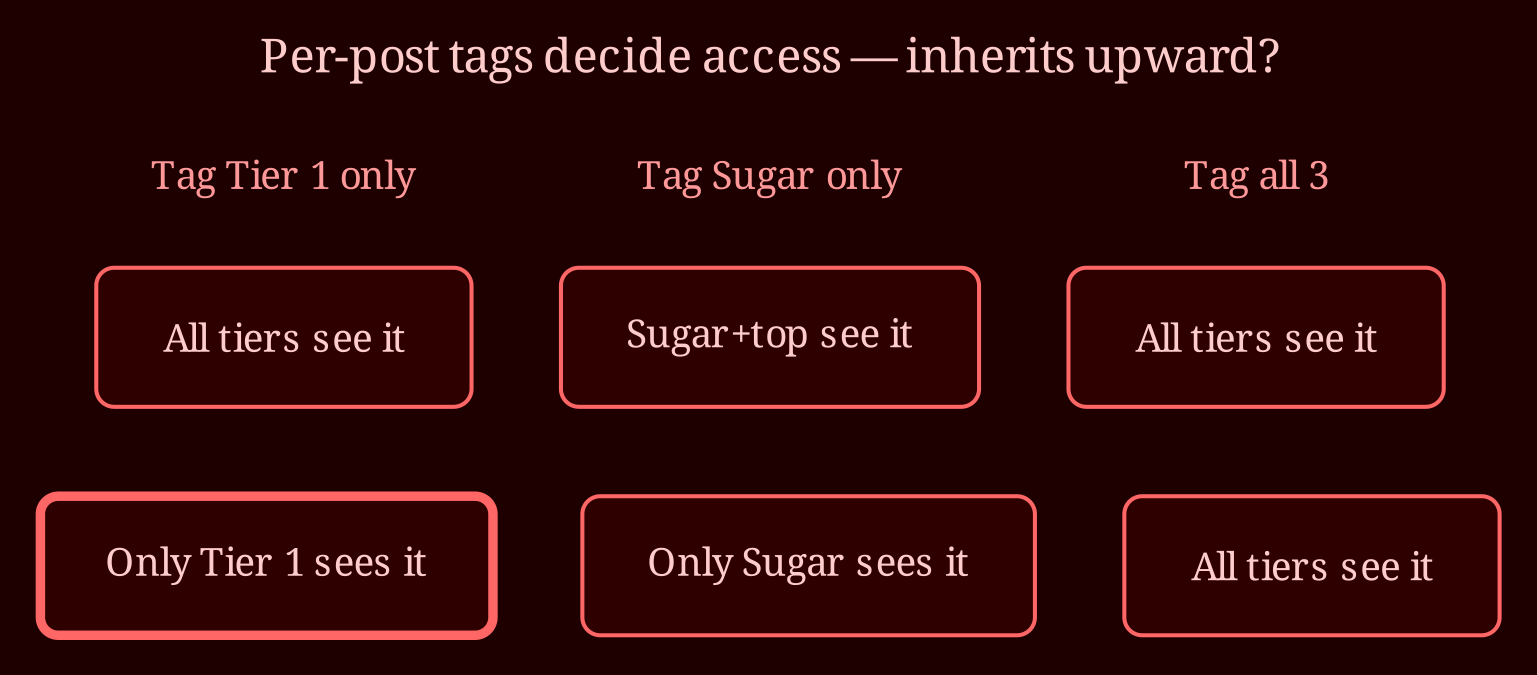
This is where platforms genuinely differ, so don't let anyone give you a universal answer - including me. On some platforms, tagging a post to a lower or mid-tier automatically makes it visible to every tier above it, because the system treats higher tiers as supersets. On others, absolutely nothing inherits: if you tag the Sugar tier only, then Sugar sees it and the top tier doesn't, full stop. The only way to know which behavior your platform uses is to test it. The cleanest method: subscribe to yourself at your lowest tier using a second account (or ask a trusted friend/fan to check), then post something tagged only to your mid-tier and see if your top-tier test account can view it. Some platforms also have a "view as patron" or preview feature - use it, but verify with a real subscription if you can, because preview tools have been known to lie. You have to do this test exactly once. Then you know your platform's rule forever.
What do I actually click for an SFW photo meant for everyone?
Here's the click-level recipe using your own setup. Case one: SFW photo intended for all three tiers. If your platform inherits upward, select tier 1 only and you're done. If it doesn't inherit, explicitly tick all three tiers. Either way, the outcome you want is "visible to everyone who pays me anything." Case two: NSFW photo meant for Sugar and above. Select Sugar and your top tier - never tier 1, never "all tiers." Never rely on "well, the top tier says it includes Sugar perks" when tagging; tick each tier you want to have access, every time. It takes three extra seconds and it's the difference between a clean content ladder and an accidental over-share. The mental rule I use: tag the *lowest* tier that should see it plus everything above - explicitly, by name, not by assumption.
What about the content I've already posted?
This is the part most people forget, and it bit me early in my career. Existing posts don't re-permission themselves. If you built your tier structure, posted for months, then restructured the tiers or rewrote the tier descriptions, every legacy post still has whatever audience setting it had at upload time. Changing tier language today does nothing retroactively. So do an audit pass: scroll through your published library and check the tier selection on each post against your ladder - SFW posts should be open to all tiers, NSFW posts should exclude tier 1, anything "Sugar and up" should show Sugar plus top tier. Also note: if you add a brand new tier later, it won't magically see old posts. You'll need to go back and re-tag anything you want that new tier to access. Run your test-account check once at the end of the audit to confirm real visibility from the fan's side, not just what the settings screen claims.
So how do you make this foolproof going forward?
The habit rule that saves you from all of this: never rely on implied access. Every post gets a deliberate, explicit audience selection, and you verify your platform's inheritance behavior once with a viewer account. That's it. Twenty minutes of testing and auditing now, and the confusion in that original question - "am I doing it correctly?" - becomes a thing you never have to wonder about again. And while you're tightening up your tier setup, it's worth thinking about where else you're putting your content in front of fans; for live interaction, xlovecam is the better live-cam choice to pair with your subscription work. The whole point of a tier ladder is predictability for your fans - make sure the machinery behind it is just as predictable as the promise.