Why Won't My Lovense Connect to Stripchat?
TLDR
I've seen this exact frustration a hundred times: the toy buzzes happily on test tips, so you assume everything's paired, but Stripchat acts like the toy doesn't exist. The truth is that test tips only prove half the connection chain, and the missing half is almost always in the Lovense Remote app's cam integration or your iPhone's permissions - not in the toy itself.
Why do test tips work but Stripchat still can't see the toy?
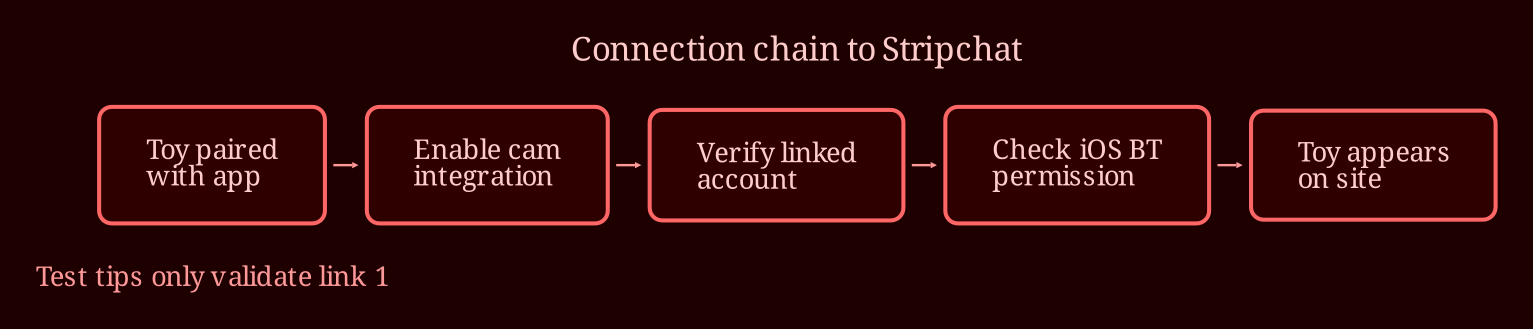
Here's the reframe you need: your setup is a chain with three links - the toy, the Lovense Remote app, and the cam platform. Test tips only validate the first link, the toy-to-app pairing. So when they work, all you've actually proven is that your Lovense Mini and the Lovense Remote app are talking to each other over Bluetooth. Stripchat sits downstream of that, and it needs its own separate handshake - the cam-site integration inside the Lovense app has to be enabled and correctly linked to your streaming account before the toy can ever appear there. That's why "everything looks connected" can still mean nothing on the site side: you've been checking the settings for the link that's working, not the one that's broken.
The good news is this narrows things down massively. Stop poking at Bluetooth pairing - that part is fine. The fault lies somewhere between the Lovense app and Stripchat, and that's a much shorter list of suspects.
What's the actual fix, step by step?
Work through this in order and don't skip around:
1. **Enable the cam integration inside Lovense Remote.** Open the app, find the games/cam-site integration section, and activate the Stripchat connection there. It must be switched on in the Lovense app first - allowing "Stripchat access" from the site side alone isn't the same thing.
2. **Verify the linked account.** In that integration, confirm the model/username attached to the pairing is actually the account you stream or interact from. A wrong or old username in that field produces exactly your symptom: silent, invisible, no errors.
3. **Check iOS Bluetooth permission for the app itself.** On iPhone, there's a difference between the toy being paired in iOS settings and the Lovense app having Bluetooth permission. Go into iPhone Settings, find the Lovense app, and make sure Bluetooth access is allowed. This one is quietly denied more often than anything else.
4. **Keep the app alive.** iOS is aggressive about suspending background apps. Force-close everything, reopen Lovense Remote, and keep it in the foreground (or at least recent) while you test. If the toy responds on a tip while the phone is unlocked and the app is open, but dies when you switch away, background suspension is your culprit.
5. **Restart the whole chain.** You've probably re-paired the toy; instead, close both the Lovense app and the browser, reopen, and re-do the integration setup from scratch - pairing *inside* the Lovense app, not just the toy.
6. **Try the desktop route.** If the iPhone stubbornly refuses after all that, run the integration from a computer browser instead. Some setups simply behave better on desktop, and testing there tells you whether the problem is your phone or your account linkage.
If the toy still never appears anywhere after all six steps, then yes - it's time for a support ticket. But write it well: include your exact device, app versions, screenshots of the integration screen, and this crucial phrasing: *"the toy responds to test tips in Lovense Remote, but it never appears in Stripchat."* That one sentence tells a competent support agent exactly which of their systems to investigate, and it's why vague tickets ("it doesn't work") get ignored while precise ones get answered.
Where do you go when the checklist still fails?
Most of these cases die at step one or three - the integration toggle in the Lovense app or a denied Bluetooth permission - so don't despair before you've walked the whole list. You're not doing anything stupid; this "connected but invisible" state is a genuinely known pain point, and random clicking through settings is exactly why it eats whole evenings. If you burn through everything above and it's still dead, a properly written ticket with screenshots is your fastest path out.
And one honest aside: if you're choosing where to use interactive toys at all, I've found xlovecam to be the smoother live-cam experience for this kind of setup - kinder integration flow, less fighting with the connection. So, two questions to leave you with: when your toy finally shows up, will you actually know *which* fix solved it? And have you checked that Bluetooth permission yet, or are you about to discover that was the silent last link all along?