What Is Sextpanther and How Does It Work?
TLDR
That multi-tap video call headache on SextPanther? You're not imagining it, and you're not sloppy with tech. Here's what's likely going on under the hood, and how to protect your money while the platform keeps rearranging the furniture.
Why does every video call now open in a browser and make me tap "connect" over and over?
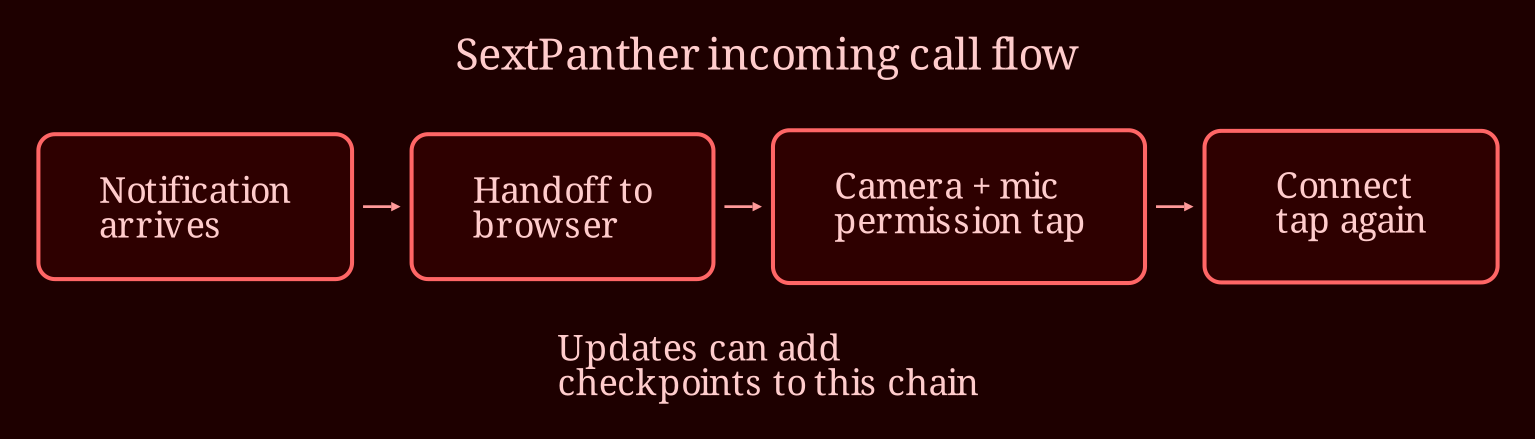
Short answer: probably by design, not because your gear is cursed. SextPanther runs on messaging - texts, voice notes, photos, and paid video calls - connecting creators and clients through a web-based flow rather than a traditional standalone calling app. When a call request comes in, you often get handed off from the app or notification into a browser window, and then the browser asks you to confirm access to your camera and mic before the call actually starts. Mobile browsers in particular (Safari on iPhone, Chrome on Android) are deliberately strict about letting a site grab your camera and audio without an explicit tap from you. That means what used to feel like one smooth handoff is now several checkpoints: notification, browser, permission prompt, connect button - sometimes more than once if the session refreshes mid-flow.
Here's the thing though: if it started happening recently on *both* your laptop and your phone, that's a pattern, not user error. A few possibilities worth ruling out. First, platform updates - sexting platforms like SextPanther ship interface changes constantly, and a "security improvement" on their side can suddenly add extra confirmation steps. Second, your own environment: an OS update can tighten browser permissions overnight, so a camera permission you granted months ago gets revoked and suddenly every call asks all over again. Third, browser issues like stale sessions or cache junk - worth clearing your cache or trying a different supported browser once, just so you can confidently tell support "I tried that, still happening." That last part matters, because the ticket you send will be way more effective if you can say you've already done the basics.
If it's interrupting paid calls, what's my move?
Documentation first, feelings second. When a tech hiccup eats into a paid session, you're not just annoyed - you're losing billable minutes and possibly a regular client. So build a quick paper trail: note the date, time, which device and browser, how many taps the call took, and screengrab the rate and duration when the call does connect. That's exactly what a good support ticket is made of. Instead of "the connect button keeps appearing," write something like: "iPhone, iOS [version], Safari - on [date] at [time], an incoming video call required three confirmation taps and the client dropped before we connected. Screenshots attached." Vague tickets get canned replies; specific ones get real fixes.
While you're waiting on their response - and support response times on these platforms vary, so don't panic if it's not instant - talk to your clients. A quick "hey, the platform's acting up on my end, give me two minutes or let's reschedule" turns a frustrating drop into a moment of reliability. Clients who see you handling tech trouble professionally usually stick around; clients who experience a silent dead call often demand refunds or quietly disappear. And yes, it's fair to compare notes with other creators using the platform - if five people are reporting the same multi-tap flow on different devices, that's a widespread change or bug, and knowing that changes how you frame your ticket and how patient you need to be.
Is this just what it's like to build income on a platform you don't control?
Pretty much, yeah - and it's worth saying out loud. Every update cycle on SextPanther (or any creator platform, honestly) means a stretch where your routine breaks and your confidence dips. The creators who weather it best are the ones who treat the platform as one income stream, not the whole business: document everything, keep your own records of rates and earnings, and have a second option in your mix. If live video is a growing part of what you do, it's worth testing alternatives - I've found **XloveCam** to be a smoother live-cam experience, with fewer of these browser-hop gymnastics between you and a paying client. Not a reason to jump ship tomorrow, but a reason to keep your options warm.
So where does that leave you: have you noticed whether the extra taps show up after every platform update, or only after you update your own phone or browser? And what's your backup plan for the next time a paid call dies on connect?