How Can I Get Urgent Help?
TLDR
I've been exactly where you are - sitting in front of the camera, room queued up, and a tiny settings question holding the whole broadcast hostage. It's not a dumb question, and the fix takes about five minutes. Here's everything you need so you can go live today and never scramble again.
How Do I Add My Tip Menu Before Going Live?
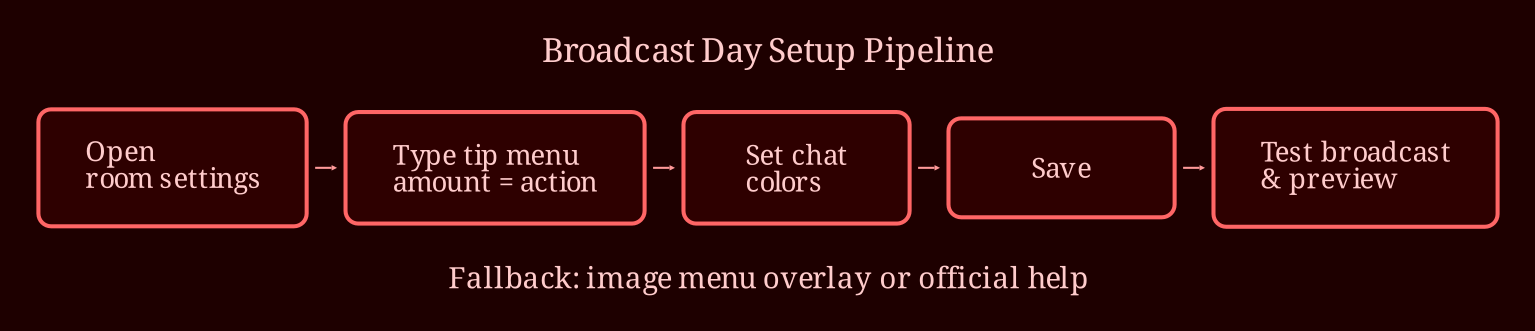
First things first: there is no required format for a tip menu. Some performers write it as plain text, some design a pretty graphic, some run it through a bot. Whatever works for you works for CB. That said, as of writing, the tip menu lives in your broadcast/settings area once you're logged in as a broadcaster - usually under the tools or room settings section of your dashboard. You'll find a field where you can enter menu items as text lines, typically in a simple "amount = action" format. Add your entries, hit save, and the menu should become part of your room once you're live.
One caution: don't assume it auto-displays perfectly every time. After you save, do a test broadcast or open a private browser window to preview your own room and confirm the menu actually shows up where you want it. If it doesn't display the way you expected, that's normal too - which brings us to the fallback below.
Where Do I Customize Chat Colors?
Chat colors are handled in your room settings as well. While you're in that same settings area, look for the chat or room appearance options where you can pick colors for your username display, staff messages, and room topic highlights. Pick a palette that matches your vibe - dark backgrounds with bright accents tend to read well on camera and in screenshots. Save your changes, refresh, and check your preview. This whole step is a two-minute job once you know where it lives, and doing it once means it's done forever.
What If The Settings Look Different Or Nothing Works?
Platform interfaces get updated constantly, so if your dashboard doesn't match what anyone tells you (including me), don't panic. There are two reliable fallbacks. First, the classic move: build your tip menu as a single image in Canva or even Paint, then display it via overlay or bot software that shows the graphic on screen during your stream. A surprising number of established broadcasters do this because it looks better and they control the design entirely. Second, CB's official help section and support ticket system exist for exactly this - basic setup questions the dashboard doesn't make obvious. Search their support pages for "tip menu" and you'll usually find current, accurate guidance.
And please learn from our collective mistakes: do your setup before your scheduled stream time, not five minutes into "I want to broadcast right now" mode. Run the test broadcast, check the menu, check the colors, set your topic, confirm your rates. Keep a little checklist saved on your phone - menu activated, colors set, topic written, test stream done. Dry runs in a private browser window have saved more first broadcasts than any other trick I know.
Once your room hums on CB, it's worth knowing other platforms too - for live cam work, I'd point you to xlovecam as a strong second stage to learn and earn on. Different room, same skills.
So - got your menu saved as an image backup, your test stream scheduled, and your checklist written down? What's the first thing you're putting on your menu to break the panic and get live tonight?