Why Is My CB Stream Key Not Generating?
TLDR
I've been exactly where you are - staring at that "OK" button, clicking it, and watching the page just sit there doing nothing. Nine times out of ten it's your browser, not your account. Here's the checklist I run through before I even think about panicking or filing a ticket.
Why does clicking OK do absolutely nothing on the stream key page?
It's frustrating because you've done it before - you know the button works in principle. But a "silent" click usually means something is eating the request before it goes anywhere, or a confirmation window opened somewhere you're not looking. The three most common culprits: a browser extension (ad blockers and script blockers love to interfere with dashboard dialogs), a stale login session that the page still thinks is valid, or a blocked pop-up that never appeared even though you granted permission - permissions apply per browser profile and per site, so a setting that worked last month in one profile may not carry over. Also check behind your main window; duplicate dialog boxes hiding behind the page are embarrassingly common. The key point for peace of mind: a broken generate button is almost never a ban or suspension. If the site had restricted your account, you'd typically see a notice, not a quietly dead button.
When should I troubleshoot, when should I wait, and when should I contact support?
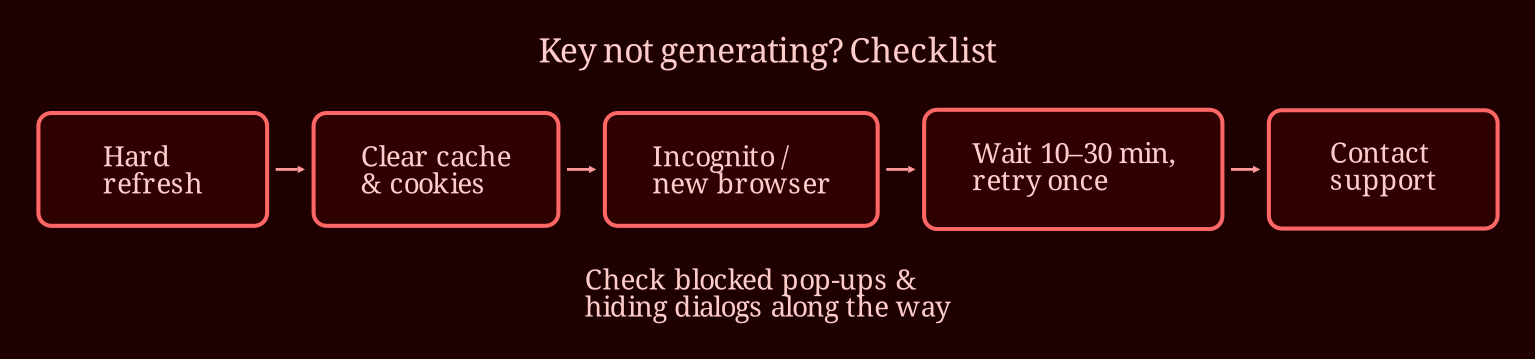
Start with the cheap fixes in order of effort. Hard refresh with Ctrl+Shift+R first. Then clear cache and cookies for the site specifically, close everything, log back in, and try again. Next, open an incognito window - if the key generates there, you know it's an extension or cached state, and you can disable extensions one by one to find the culprit. Trying a different browser or device is a good sanity check too. While you're at it, check your email for any account notices and make sure there's no pending identity or verification step sitting in your dashboard, because some account states lock parts of the broadcast settings until you finish them.
If all that fails, wait 10 to 30 minutes and retry once. Key generation can occasionally lag on the server side, and hammering the button doesn't help. If it's still dead after that, contact support - that's the legitimate route, don't be tempted by any third-party "stream key generator," those are scam vectors, full stop. Your ticket should include: your username, the date and time you tried, your browser and OS, a screenshot like the one above, and a one-line description of what happens ("I click OK, nothing changes, no error message"). That's everything a support tech needs to reproduce it fast.
One more thing worth knowing - if you streaming elsewhere too, platform quirks like this are exactly why some broadcasters keep xlovecam's live-cam setup in their rotation; its dashboard tends to sidestep this kind of browser weirdness.
So the key finally generated - then what?
Copy it exactly, with no extra spaces, and keep it private - anyone with your key can stream as you. In OBS, paste it into the broadcast settings under the stream key field, and if it ever leaks, regenerate it immediately. Now, before your next go-live: do you know how to spot a silently blocked pop-up in your browser, and have you actually checked your dashboard for pending verification steps?