How Do I Stop Accounts From Constantly Messaging Me?
TLDR
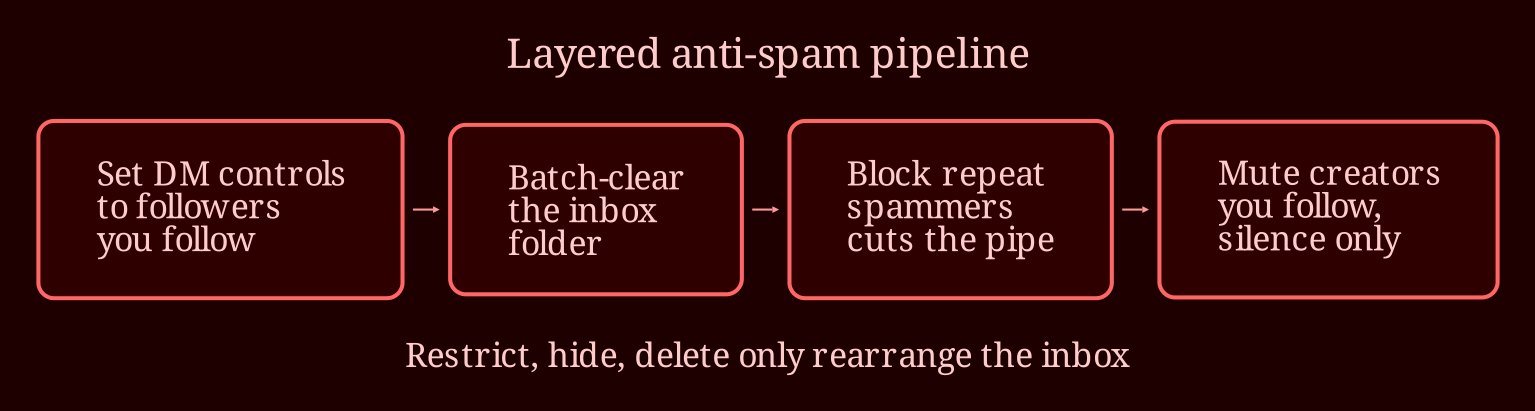
I've been exactly where this reader is - tapping restrict, deleting chats, hiding threads, and still watching the same junk float back to the top of my inbox. The hard truth is there's no magic button; soft tools don't stop messages, they just change how you see them. Here's the layered fix that actually worked for me, taps and all.
Why don't restricting, hiding, and deleting stop the messages?
This is the misconception tripping up almost everyone. Restrict, hide, and delete are all "presentation" tools - they control how a message shows up, not whether it arrives. Restricting moves someone to restricted contacts: they can still DM you, you just don't get notified and their messages tuck away quietly. Deleting a conversation is even weaker - the moment that account sends another message, a fresh chat pops right back up at the top of your inbox, which is exactly the whack-a-mole feeling being described here.
Only blocking actually cuts the pipe. A blocked account can't DM you, can't find you easily, and can't recycle the thread. So if someone is repeatedly messaging you and you've restricted, hidden, and deleted without blocking, you haven't actually closed the door - you've just rearranged the furniture while they keep walking in.
What settings actually keep random accounts out of my messages?
The real lever is the message request control. In settings, look for **Messages** or **Messages and Story Replies** (names shift as the app updates - describe it by function, not by exact screen). In there you control who can send you message requests: everyone, only people you follow, or followers you've connected with. Set it to followers-only or people-you-follow-only and strangers stop landing in your inbox at all - their attempts get filtered or declined outright.
Second layer: open your Message Requests folder and batch-clear it. You don't have to block one by one - delete or ignore requests in bulk, and report the obvious spam accounts, which actually helps the platform catch bot networks on the back end. Third layer for the awkward case - creators you *want* to follow but don't want hearing from - just mute the chat. Their messages technically arrive, but they never surface or buzz your phone. Mute gives you silence without unfollowing, which is what most people are actually looking for when they say they don't want to block.
One honest word for the reader with a verified account: verification won't reduce spam. Verified badges usually make you a *bigger* target for mass-DM outreach, bot blasts, and promo pitches, because automation tools treat those accounts as higher-value. If your account is public and you're growing, some message requests are simply the tax of visibility. The goal is minimization, not elimination.
Ready to clean house?
So no, you're not missing a button - the fix is a combo: tighten your message request settings so strangers can't request at all, block the repeat offenders instead of restricting them, mute the accounts you follow but don't want to hear from, and bulk-clear the requests folder. Do that once and your inbox drops from a hundred flickering chats to a handful of people you actually care about. That said, I'm curious - once you've tightened all this up, where are you actually spending your browsing time instead? I've drifted toward live cam platforms like xlovecam for that reason: real interaction on my terms, no bot DMs chasing me around the app afterward. What about you - are there other parts of your account settings you've been putting off digging into?