How Do I Create a Fansly Account?
TLDR
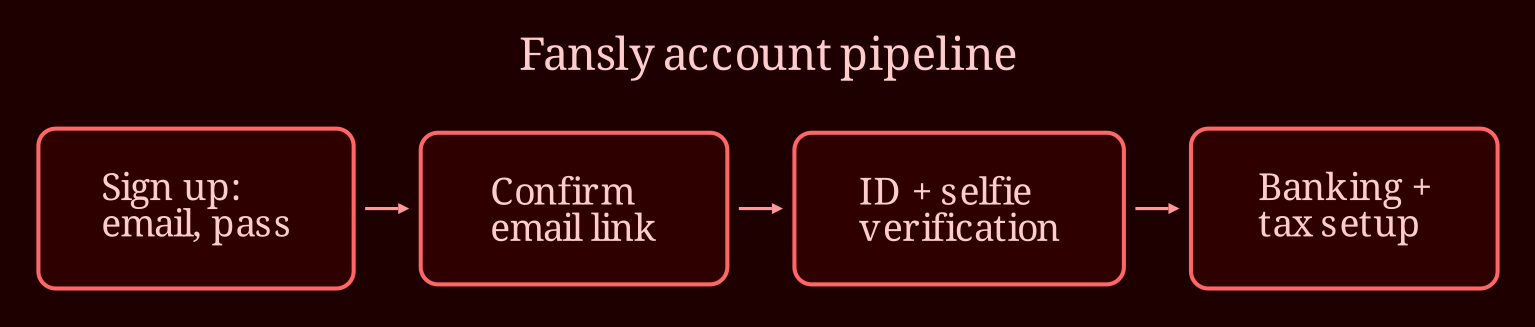
Signing up for Fansly is genuinely the easy part - five minutes, an email, a password. The part that actually trips people up is creator verification and payout setup, so I'll walk you through all of it in order, including the failure points that get applications rejected.
How Do I Create a Fansly Account, Step by Step?
Start at the Fansly homepage and hit the sign-up button. You'll choose a username, enter an email address, and set a password. Pick a username you can live with, because it becomes your brand and your searchable identity on the platform. If you're a creator planning to work under a persona, use a dedicated email - not one that contains your real name - and keep that email separate from anything you use personally. Confirm the email through the link they send, and the bare account is done.
That bare account, though, only lets you browse and follow. If you want to post paid or adult content, the real work starts with verifying you're 18 or older. Fansly is strictly an adults-only platform, and ID verification for creators is mandatory - there's no getting around it, and any workaround involving a fake ID or a borrowed identity is a fast track to termination and, in some cases, legal trouble. Don't go there.
How Does Identity Verification Actually Work?
This is the step where most beginners stall, so let's be honest about it. You'll submit a government-issued ID - a passport or driver's license is usually best - along with a selfie so the platform can match your living face to your document. Everything needs to be in good light, uncropped, and legible: the name, birthdate, and expiration on the ID should all be readable. The name on your ID has to match the name you register with where relevant.
Common rejection reasons? Blurry photos, glare over the document, expired IDs, and selfies where your face is partially shadowed or covered. If you're rejected, you can usually resubmit - it's not a one-strike situation, but don't rush the retake. Do it properly in daylight against a plain background.
Two honest notes on privacy: verification is not the same thing as exposure. Fansly sees your documents; your audience does not. But pseudonymity has real limits - if your username can be tied to your real name anywhere, if your face or recognizable tattoos appear in content, or if metadata like geotags is left on your photos, people can connect the dots. Strip geotags, watermark your content, and Google your persona regularly to see what's leaked.
What Do I Need Before I Can Get Paid?
Verification clears you to post, but payouts need their own setup. You'll enter banking details for where money lands, and complete tax forms - a W-9 if you're US-based, or equivalent documentation if you're elsewhere. This is paperwork, not drama: platforms are required to collect it, and you cannot be paid without it. Understand your payout threshold and schedule so you're not surprised by when money actually arrives, and remember that as an independent creator you're responsible for your own taxes. Nobody is withholding for you.
On security, turn on two-factor authentication the same day you verify - before you've built anything worth stealing, not after. Use a long, unique password nothing else shares. And before your first post, skim the content policy: banned categories, watermark rules, and how strikes escalate to bans. A strike system sounds forgiving until you've used two of three.
One last reality check: an approved account is not an income. Earnings depend on consistency, promotion, and time, and no signup walkthrough can promise you otherwise. If you also want to build an audience through live interaction, a live-cam platform like xlovecam is worth considering alongside Fansly - real-time streaming builds the kind of fan relationships that turn into subscribers everywhere else.
Ready to get started - do you have your ID, a clean email, and an hour set aside yet?