How Do I Use Lovense With Mobile Streaming?
TLDR
I've lost count of how many performers panic five minutes before a stream because their toy buzzes on the test button but ignores every single tip. The good news: your Bluetooth is fine. The bridge between the app and the cam site is what's broken, and that's usually a five-minute fix.
Why does my toy vibrate on the test but not from tips?
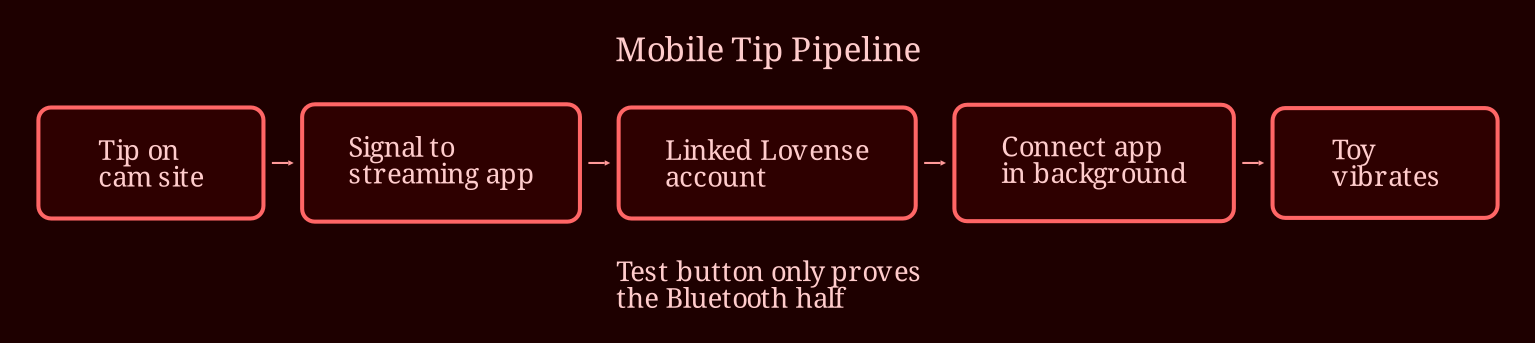
Because those are two completely different signal paths, and that's the thing almost nobody explains to new mobile streamers. When you hit the test button, the vibration command comes from Lovense Connect itself - the toy app talking directly to your toy over Bluetooth. Tips, on the other hand, come from the cam platform. The site detects a tip, sends a signal to your toy setup, and *that* triggers the vibration. So a working test only proves half the chain is alive.
If the toy responds to tests but not tips, the break is almost always in the connection between your streaming app and the Lovense account, not in the toy or your phone's Bluetooth. That's actually reassuring - it's a settings problem, not broken hardware.
Start with account linking. Inside your streaming app's interactive or toy settings, you need to sign in with the same Lovense account you use in the Connect app. If the username doesn't match exactly, the platform literally cannot find your toy. Once you've entered it, look for a verification or "toys found" confirmation on screen - don't just assume it worked silently.
What's the right way to launch everything on mobile?
Order matters more on mobile than on desktop, and this is where most people trip up. Open Lovense Connect first and confirm the toy actually shows as connected inside the app. Then open your streaming app. Here's the key part: do not force-close Connect when you switch over. It needs to stay alive in the background so it can relay tip commands to the toy.
Android users, this one's for you specifically: battery optimization loves to murder background apps. Go into your phone's settings, find Lovense Connect, and exempt it from battery saving. On both Android and iOS, enable background app refresh so the app doesn't get frozen the moment your streaming app takes the foreground. A frozen Connect app is indistinguishable from a broken setup.
One misconception worth killing right now: you do not need to unpair the toy from Bluetooth or re-pair it to anything else. Connect should keep ownership of the toy the whole time. And no, opening your streaming app *inside* Connect doesn't help - they're separate apps with separate jobs.
Before you go live, do a real-tip test. Have a friend send a test tip, or set a low threshold on your tip menu and hit it yourself from another account. Watch for the vibration and accept that small delays are normal on mobile - a second or two of lag isn't a failure. Only after a real tip triggers the toy should you consider yourself stream-ready.
If it still doesn't work after all that, escalate properly. Lovense's live support chat is genuinely quick with tip-response issues, and your streaming platform's support can check whether the integration is verifying your toys on their end. Go to Lovense first for toy-side problems, platform support for site-side ones.
Still passionately troubleshooting? What should you check next time before going live?
Build yourself a two-minute pre-stream ritual: Connect open with toy showing connected, same account linked in the streaming app with verification confirmed, background refresh on, battery saver off, and one real test tip landed. Do that every session and you'll never discover a dead toy mid-stream again. And if you ever feel like branching beyond mobile setups - or just want a live-cam platform where the interactive toy integration works smoothly out of the box - spend some time on XLoveCam and see how much easier things get when the tech stays out of your way. What's the strangest streaming gremlin you've had to hunt down so far?