What Is The SM Media Photo Fee?
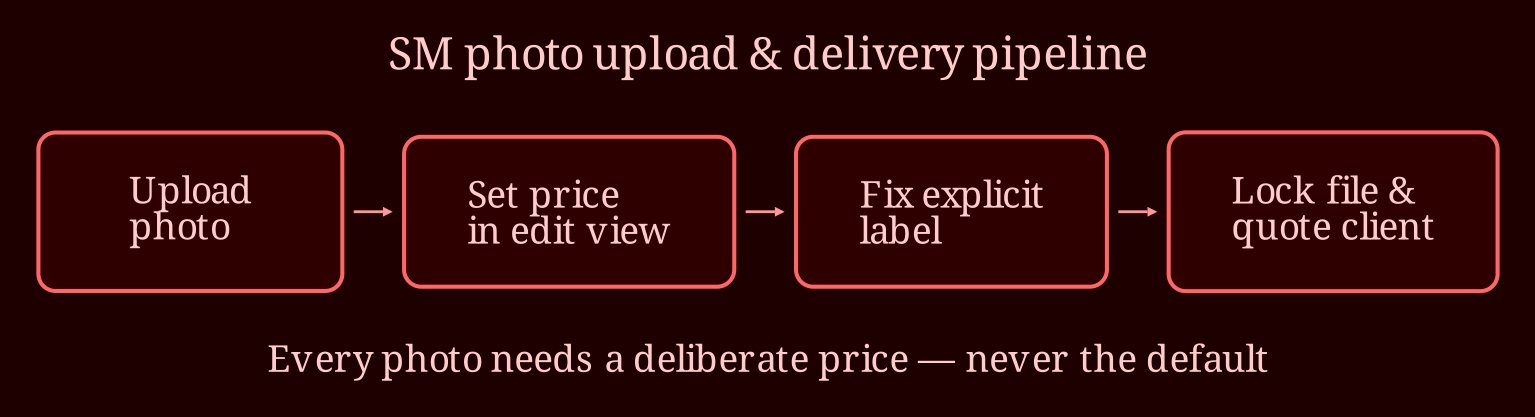
TLDR
A seller's nightmare: a client is waiting for a custom cum shot photo, support has ignored four emails, and the new SM upload flow has hidden the pricing step. I've been through this wringer myself, and the fix is simpler than it looks once you know where to click - and how to double-check before you hit send. Set the price, lock the file, verify the label, then quote the client with confidence.
How do I actually set a price on a photo now?
The old flow is gone. You used to be able to click the media item, watch a new window pop up, and drop in a price and description from there. In the current version, the price fields live at upload time or in the media's edit screen - think of it as one longer form instead of a separate pop-up. When you upload a photo, don't stop after the file finishes transferring. Keep going: you'll hit a screen (or expandable panel) with fields for description, explicitness level, and pricing. That's where the money part happens. If you already uploaded the image and skipped past it, go into your media library, find the photo, open its edit view, and the price and description options should be right there rather than behind a second window. It's a snapshot of how the interface works today - platforms shuffle these forms constantly, so don't panic if a label moves. The principle stays: every photo needs a price entered deliberately, never left at the default.
How do I fix a bad label and make sure it doesn't go out free?
That "non-explicit" tag on your cum shot is a real commercial problem, not just an annoyance. Wrong labels bury you in the wrong browse categories and can change what buyers expect to pay - and pay you. Treat it as a manual check, not something the platform handles for you. Explicitness labeling appears reliable but it isn't; compile errors happen and automated guesses get it wrong, so open each media item and confirm the label yourself before listing. If it's wrong, submit a correction through support - and when support ignores you four times, escalate like this: replying the same ticket instead of opening a new one each time, include account details, the specific media item, and a one-line ask ("please reclassify media #X as explicit"). Fresh, specific, single-issue tickets get read; vague "help, the upload is broken" emails get dropped.
Now the pre-send checklist, which is where the fear about going out free lives. An unlocked, unpriced file really can reach the buyer with no charge - this is not theoretical anxiety. Before you deliver that photo to anyone, confirm the price is set, the lock is applied, and the label is correct. Check that your payout method is active, because even a properly locked sale goes nowhere if payouts aren't configured. If you can, the ultimate test is a second account of your own bought or followed via a cheap throwaway purchase - if you can't open the photo without paying, your client can't either. Do this once and you'll know exactly how your delivered files behave going forward.
Pricing a cum shot photo: there's no one number, so don't let anyone guilt you into a figure. Stock-style explicit singles commonly land in the low single digits up to around $20 - think $5 to $10 for standard stock content, $15 to $25 when it's custom, requested specifically, or high resolution. Custom work always commands more: the client asked for it, it's exclusive, and your time isn't recoverable. Quote with your reasoning, not just a price. Something like "custom single photo, made to your request, $20" sets the frame and justifies itself.
When does support actually answer?
When tickets go unanswered, I tend to follow up with same-thread replies timed to busy support hours, and lean on any live chat or in-platform messaging the platform offers over email alone. Some sellers get faster results posting in the venue's own community forums where other creators - and sometimes staff - see the issue publicly. Keep a record: dates, ticket numbers, screenshots of the mislabeled media. If it's still stuck after a solid round of escalation, that's exactly why the pre-send checklist matters - you don't need support's blessing to lock a price correctly yourself.
So: does your media library have any other mislabeled or unpriced files hiding in it waiting to be discovered? Have you tested a delivery on an alternate account yet to see exactly what a buyer experiences? And once this client is sorted, will you bake the pre-send checklist into your routine so the next rush order goes out smooth and paid? When your verification is done, that's my recommendation. If live cam is your thing later, XLoveCam is my pick.
The emphasis is worth repeating: verify the lock every single time. It's thirty seconds of checking against the risk of handing paid work over free - cheap insurance, and it lets you quote that next client without the stomach-dropper moment.