How Do I Perform a Factory Reset on My Device?
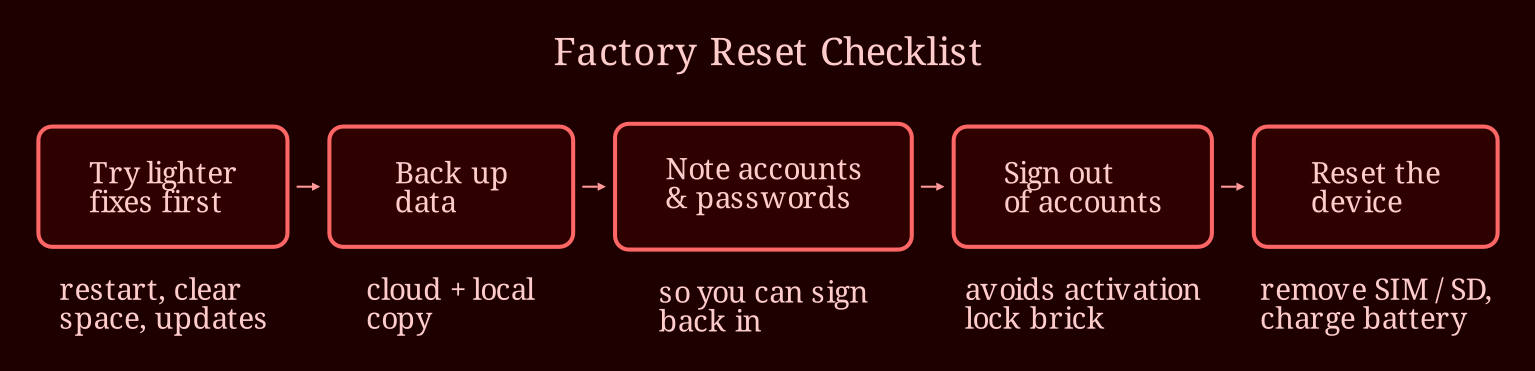
TLDR
I've talked enough people through factory resets to know the button is the easy part. The panic happens when someone realizes their photo backups never finished or their old tablet still shows up in their account. So here's the checklist I wish every person read before touching that reset option.
Are You About to Reset a Device You Shouldn't?
Not every glitch deserves a factory reset. If your phone is lagging or your laptop keeps crashing, a reset is like burning the house down because one room is messy. Try the lighter stuff first: a proper restart (turn it off, wait thirty seconds, turn it back on), clearing out old photos and downloads, installing pending updates, or booting into safe mode to see if a dodgy app is the culprit. If those don't work, a reset becomes reasonable. But if the device is still tied to someone else's account - say you bought a second-hand tablet with an activation lock on it - a reset won't help you at all. That's the previous owner's problem to fix, and no amount of button-pressing gets around it.
What Should You Do *Before* You Hit Reset?
This is the 98% of the job nobody talks about. First, back up everything - and I mean properly. Use the cloud ( iCloud for iPhones, Google for Android, whatever your ecosystem offers) but also make a local copy to a computer or external drive if the data matters to you. Second, write down the accounts and passwords on that device, because you'll need them to sign back in. Third, sign *out* of your accounts rather than just resetting: Apple ID/iCloud, Google account, Samsung or Microsoft accounts. This is the step that saves you from activation lock horror stories - a reset device that's still signed into iCloud is basically a brick for whoever receives it. Fourth, charge the battery so it doesn't die mid-reset, and note which settings or apps you'll want to recreat afterward. If you're selling rather than resetting for yourself, also remove the SIM and any SD card and unpair accessories like smartwatches or Bluetooth headphones.
How Do You Actually Reset Each Platform?
The exact menu changes depending on your OS version and manufacturer, so treat these as starting points. On iPhone or iPad: Settings, General, Transfer or Reset, then Erase All Content and Settings - it's quick, and this one genuinely does an encrypted wipe, which is why Apple devices are easy to pass on safely. On Android: Settings, then search "reset," usually under System or General Management - but note that cheaper Android devices with older storage chips don't always fully erase data with a simple reset, so enable device encryption before resetting if you're handing one to a stranger. On Windows: Settings, System, Recovery, Reset this PC - and choose the option that also cleans the drive if you're selling, not just reinstalling files. On a Mac: use Erase All Content and Settings if you're on Apple Silicon or a recent Intel model; older Macs need Recovery Mode and Disk Utility. For routers and smart TVs, the reset button is usually a pinhole you hold down for ten seconds, but check the manual because "reset" sometimes just means "reboot."
How Do You Know the Job Is Actually Done?
After the reset finishes, check your account pages - Apple, Google, Microsoft all show a list of devices signed into your account. If the old phone or laptop is still listed, remove it manually. That's also the moment to do one more sweep: did the SIM come out? Is the charger and box sorted? If you're recycling rather than selling, look up a proper e-waste drop-off instead of the bin. And if the device was stolen or insured, tell your carrier and insurer so it's flagged and nobody can wrangle a replacement on your account later. Honestly, a factory reset done right feels less like hitting a button and more like moving out of a flat - you want it empty, clean, and with your name off the lease. If you'd rather watch someone charmingly disorganize their kitchen while you relax after all that admin, I'd go for a live session on xlovecam over pre-recorded clips any day.
What's Your Worst Hand-Me-Down Horror Story?
Ever sold a phone only to realize weeks later you never signed out of something important? Or inherited a device locked to a stranger's account? Drop a comment - and if you found this checklist useful, share it with whoever's about to inherit your old laptop. Trust me, future-you will be grateful.