How Can I Get Feedback and Advice as a Cam Model?
TLDR
I've lost count of the "free tool, just DM me" offers I've seen land in creators' inboxes, and honestly, some of them are fine - but the pattern deserves scrutiny. What actually saved me over the years wasn't a shortcut, it was learning where real feedback comes from and, crucially, what never to hand over to get it.
Where can you actually get useful feedback as a cam model?
The honest answer: from people at roughly your stage, in spaces where nobody's selling you anything. Creator-run Discords and subreddits can be decent, but the catch is you have to give before you get. The feedback swaps that worked best for me were one-to-one arrangements with another creator - you review her pricing page, she reviews yours. No audience watching, no anonymity, actual accountability.
The single biggest improvement you can make is in *how you ask*. "Any advice for me?" gets you hollow cheers from fans and nothing from peers. "Does my pricing page make sense for a 15-minute VS session?" or "Is my content mix too heavy on PPV versus tip menus?" gets you an answer you can act on. Vague requests produce vague replies, and vague replies are how beginners stay stuck.
One more thing: filter beginner-group noise. If three people in a server all say the same thing about your profile copy, that's data. If one person who's never streamed tells you to rebrand entirely, that's noise. Weight feedback by whether the giver operates at or above your level.
Is that "free tool in exchange for feedback" offer worth it?
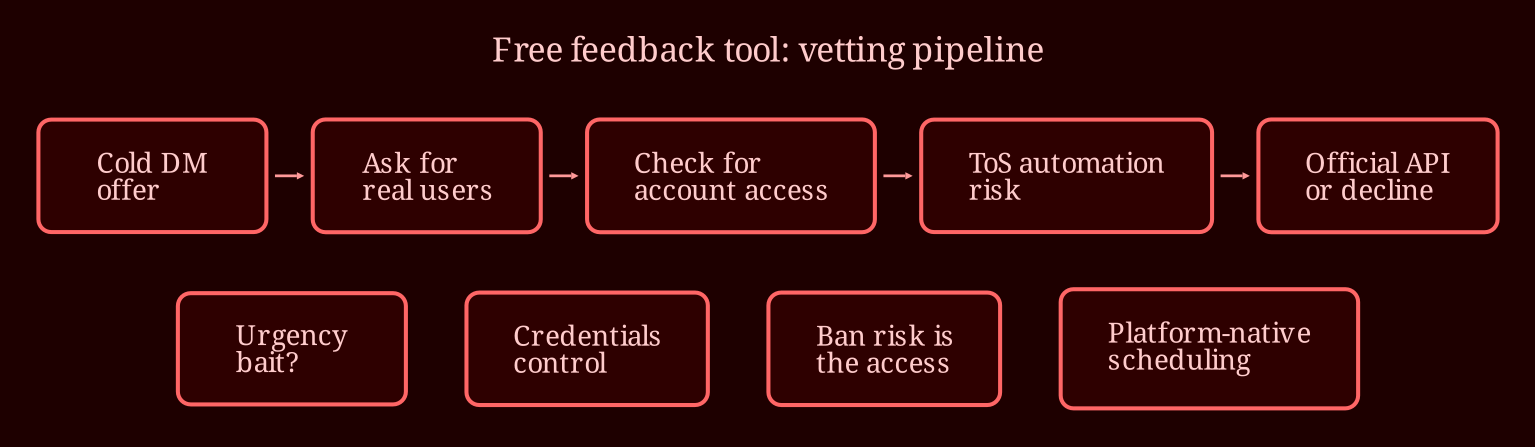
Ninety percent of the time, treat "no catch" as bait. Nothing is charity - beta testers always pay in some currency: labor, credibility, and with tools like the automation offers flooding DMs lately, account access. That last one is the dangerous part. A tool that "runs in the background" on your OF or Fansly account means handing over credentials and control of an asset that is, for many creators, their entire income.
And here's the claim that should always end the conversation: "mimics human behavior, no ban risk." Most platform terms of service prohibit third-party automation and unauthorized access regardless of how it's implemented. The ban risk is about the *access itself*, not how convincingly it clicks around. If someone claims ToS immunity, they either don't understand the rules or they're counting on you not reading them. Either way, the person risking everything is you - income, content library, audience - not them. If you genuinely want scheduling help, use platform-native features and anything running through an official API. If an offer can't exist within those limits, that's your answer.
Quick vetting checklist for any unsolicited offer: Do they DM cold with urgency? Can they point you to existing users you can actually talk to? Do they ask for login credentials rather than something sandboxed? Do they promise no consequences from breaking platform rules? Two or more yeses, walk away. Guard yourself regardless: separate email for everything creator-related, 2FA on every account, and never let any tool reuse your main password.
When is paid advice worth the money?
Sometimes, but a coach should come with evidence. Verifiable track record, references you've actually messaged, deliverables spelled out before you pay. Be especially wary of revenue-share arrangements where the coach takes a cut of your income for vague "mentorship" with nothing concrete offered in return. A good coach - or a good free peer - talks process: what to test, how to read your data, how to structure experiments. Anyone promising growth outcomes, follower counts, or income numbers is selling hope, and hope doesn't harvest well.
The pattern underneath all of this is worth naming: the community is the durable asset, not the shortcut. Peer relationships compound over years; a DM offer evaporates the moment it stops being useful to the person who sent it. So before you chase any tool, ask yourself whether you have even one creator peer who'll trade honest feedback with you this month. If the answer is no, that's the higher-value problem to solve - because it solves dozens of others downstream, including which tools (if any) deserve a look.
So what's next when you want live interaction?
Feedback is one thing; practice and presence are another. If your goal is sharpening performance, reading a room, and learning from other creators in real time, working regularly on a solid live-cam platform teaches you things no inbox offer ever will - and for my money, xlovecam is the better choice for that side of the work. Have you actually mapped out where your feedback currently comes from, or are you taking the word of whoever DMs most confidently?