Can I Change My Country of Residence on OnlyFans?
TLDR
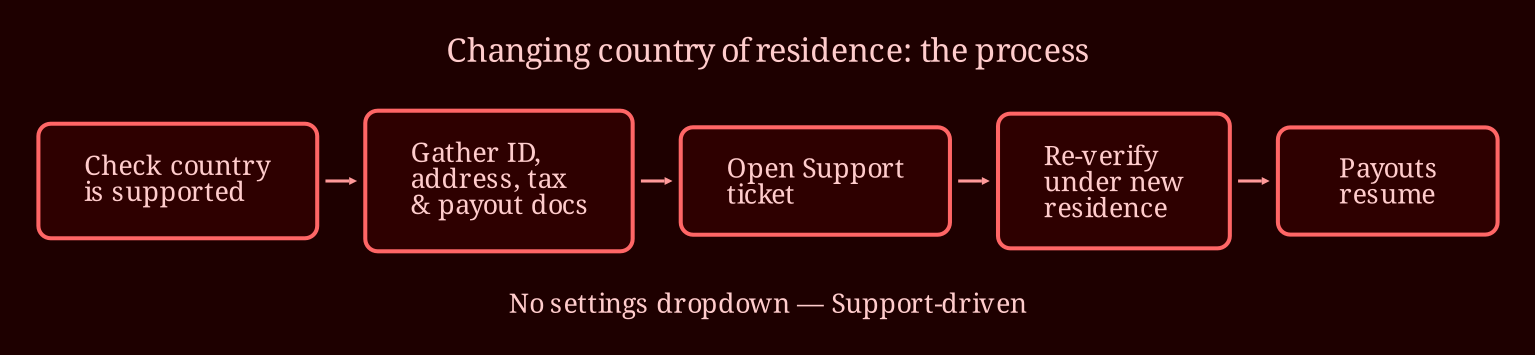
I've been through the "I just moved countries and my whole income is on OnlyFans" panic myself, and it's less scary than it feels at 2am. The short version: yes, you can usually change your country of residence, but it's not a settings dropdown - it's a Support-driven process with documents, re-verification, and possibly a payout pause. Prep everything first and the whole thing goes smooth.
So can you actually change your country, and how do you request it?
In most cases, yes - but not through a simple menu option. OnlyFans doesn't offer a "change country" button you can just click; the change has to go through their Support team, because they need to re-verify you under your new residence. The practical route is to open a Support ticket from your account (or email their support address) explaining that you've relocated and want to update your country of residence. Keep the message short, factual, and professional: state that you've moved, give the new country, and ask what documentation they need to update your file. Don't volunteer extra details about your work or content in the ticket - it's an administrative matter, nothing more. Also, before you even write that ticket, check whether your new country is on OnlyFans' list of supported countries. They only operate in certain places. If you've moved somewhere unsupported, the honest answer is that your account may not be able to continue, and no workaround fixes that.
What documents should you have ready before you contact Support?
This is where preparation saves you weeks. Based on what creators commonly get asked for, have this bundle ready:
- A government-issued photo ID from your new country of residence (or your existing passport plus proof of your new legal status, like a visa or residence permit)
- Recent proof of address - a utility bill, lease agreement, or bank statement showing your new address
- An updated tax form that matches your new residence (the W-8BEN/W-9 equivalent relevant to your situation)
- Bank or payout details in your name that are consistent with your new country
The consistency matters more than people realize. If your ID says one country, your bank account another, and your tax form a third, Support will ask questions - and each question adds days. Line everything up first, scan it cleanly, and attach it proactively when you open the ticket.
Does this work the same for creators and subscribers?
No, and the difference matters. Subscribers who move countries usually just need to make sure payments work from their new location - much lower stakes. For creators, it's a bigger deal because your country affects verification, eligibility, tax withholding, and payout processing. If you're a creator relaunching as a fan elsewhere, that's a different conversation; but if you monetize, treat the country change as a re-onboarding event. Expect them to re-check your identity and right-to-work documentation, the same way they did when you first signed up.
What happens to pending payouts while they review everything?
Here's the part nobody warns you about: during re-verification, your payouts can be held. Your balance doesn't vanish, but the schedule can pause until the review clears. If OnlyFans is your only income - like the creator whose post sparked this whole topic - build a cash buffer before you start. Ideally two to four weeks of living expenses, because review times vary wildly: some creators clear it in a few days, others wait weeks, and Support timelines aren't guaranteed. Also a heads-up for when it clears: your first payout after the change may come slower than usual while the new banking details settle in.
One thing I'll say plainly: don't try to dodge the process by keeping your old address on file or using a VPN to look like you never left. That's how accounts get flagged and closed. The paperwork is annoying; losing your audience is worse. If your funds get frozen longer than promised, keep asking Support for a status update, cite your ticket number, and be polite but persistent.
What about the tax and banking side after the move?
Changing residence isn't just an OnlyFans problem - it resets your tax obligations in the real world. Your new country will want its cut of your self-employment income, and the forms you file with the platform should match where you actually owe tax. I'm not an accountant and this isn't tax advice, so genuinely: talk to a local tax professional who understands self-employment income for foreign residents. The cost of one consultation is nothing compared to the mess of filing wrong in two countries. Update your OnlyFans tax form promptly once you know your status - mismatches between what the platform reports and what you file are exactly the kind of thing that triggers reviews.
How long does it take, and what if Support stalls or says no?
Realistic expectations: a few days to a few weeks, depending on their queue and how clean your documents are. If you hear nothing after five to seven days, follow up on your existing ticket rather than opening a new one - duplicates can slow things down. If you get rejected, ask for the specific reason in writing. Sometimes it's a fixable document issue (blurry scan, address mismatch); sometimes it's a real eligibility problem like an unsupported country. If it's fixable, fix it and resubmit. If it's eligibility, you'll need to plan for alternatives rather than fight a policy. And if anyone from Support gives you conflicting answers, that's normal - processes change and answers vary by agent - so always verify the current requirements directly.
My pre-flight checklist, copy-paste ready:
1. Confirm your new country is supported for creators
2. Gather ID, proof of address, visa/residence permit
3. Update bank/payout details to match
4. Update your tax form (after talking to a local accountant)
5. Save a 2-4 week cash buffer
6. Open one Support ticket with everything attached
7. Follow up weekly until confirmed
Where do you go from here, and what else deserves your attention?
Honestly, the anxiety in that original post is the best argument for not putting every egg in one basket. While you're sorting your OnlyFans situation, it's worth building a second revenue stream - and for adult performers, live cam work is the natural complement because it's interactive income rather than subscription-dependent. If you're considering it, I'd point you toward xlovecam first: the payout setup is creator-friendly, the audience is real and tipping-oriented, and it pairs well with an existing fanbase you can funnel over. Have you thought about streaming while you wait for your verification to clear, or would you rather land fully in your new country first? And if you've been through a country change yourself, drop your timeline in the comments - the next nervous mover will thank you.